
If you’ve just lost your job, gone on maternity leave or need to declare a domestic worker, the last thing you want is to fight with a government website. Yet that’s exactly where most people get stuck: the UIF login page.
The short answer
Workers log in on UIF Online with their 13-digit ID number, a password and a captcha. Employers log in on uFiling. Both are free.
Note: uif-login.co.za is an independent blog, not the UIF or the Department of Employment and Labour. We’ll never ask for your ID number, password or bank details. Only type those on official labour.gov.za websites.
Table of Contents
- What UIF login actually is
- UIF Online or uFiling?
- What to have ready
- Registering for the first time
- Logging in, step by step
- uFiling login for employers
- Forgot your password or username
- What you can do once you’re in
- Applying for benefits online
- Benefits and how much you could get
- Contributions for employers
- Common login problems
- Contact details
- FAQs
What UIF login actually is
The Unemployment Insurance Fund pays short-term relief to people who stop earning because they were retrenched or dismissed, fell ill, went on maternity or parental leave, adopted a child, or had their hours cut. It also pays dependants when a contributor dies. Every month, 1% comes off your payslip and your employer adds another 1% – this is the money you claim back from.
Logging in online means you don’t have to stand in a labour centre queue to register, claim, upload documents or keep your payments going. It’s free, and you can do it from your phone.
UIF Online or uFiling? Pick the right door
A lot of older guides still tell workers to claim on uFiling. That’s out of date. The uFiling site itself now says employee benefit claims are no longer processed there – they’ve moved to UIF Online.
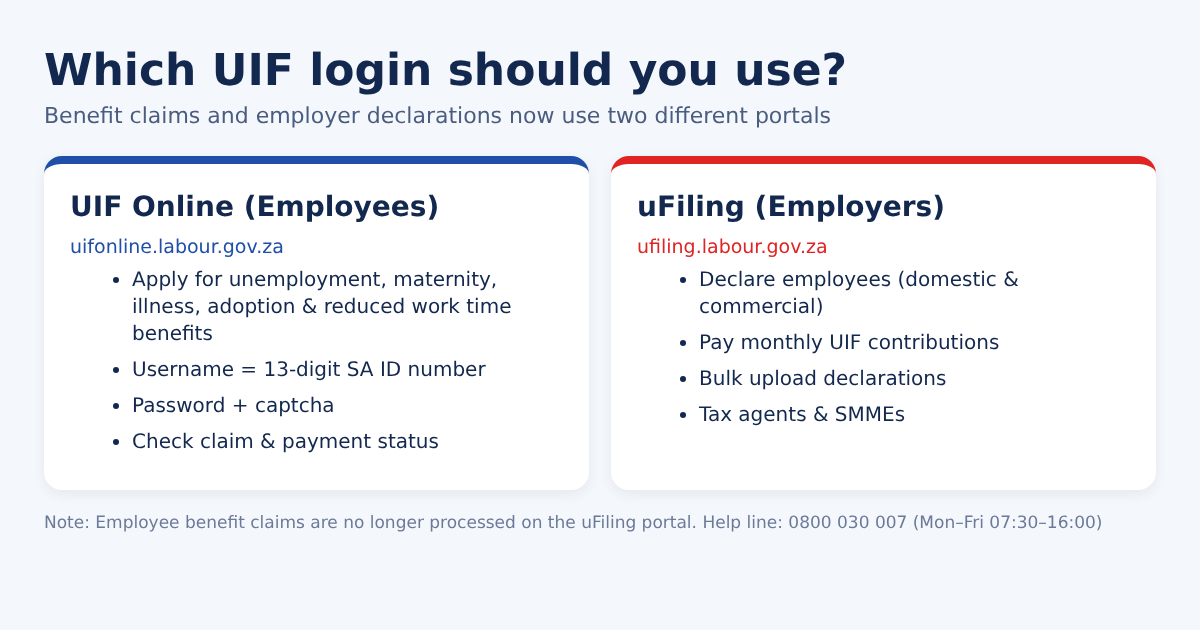
UIF Online (for workers)
Register, claim unemployment, maternity, illness, adoption or reduced work time benefits, and follow up on your claims. Your username is your ID number.
uFiling (for employers)
Domestic employers, businesses and tax agents declare workers, pay monthly contributions and bulk-upload declarations here.
What to have ready before you start
Gather these first. It saves you from timing out halfway through a form.
Everyone needs:
- Your 13-digit South African ID number – this becomes your username
- A cellphone number you actually have access to (OTPs go here)
- A working email address
If you’re claiming, also have:
- A copy of your ID (foreign nationals: passport and work permit details)
- UI-19 from your employer, confirming your employment and why it ended
- UI-2.8 banking details form, stamped by your bank, plus a recent bank statement in your own name
- Your latest payslips (many people are asked for the last six) and your termination or retrenchment letter
- Proof that you’ve registered as a work-seeker on ESSA (for unemployment claims)
- A medical certificate for illness or maternity claims, or the court order for adoption
Scan everything as clear PDFs or JPGs before you log in. Blurry or oversized uploads are one of the main reasons claims get sent back.
Employers need: your ID or passport, an official email, the UIF employer reference number (if you have one), company (CK) registration and SARS PAYE numbers, each worker’s name, ID number, start date and salary, and a bank account for contributions.
Registering on UIF Online for the first time
You only do this once, and it usually takes 10–15 minutes.
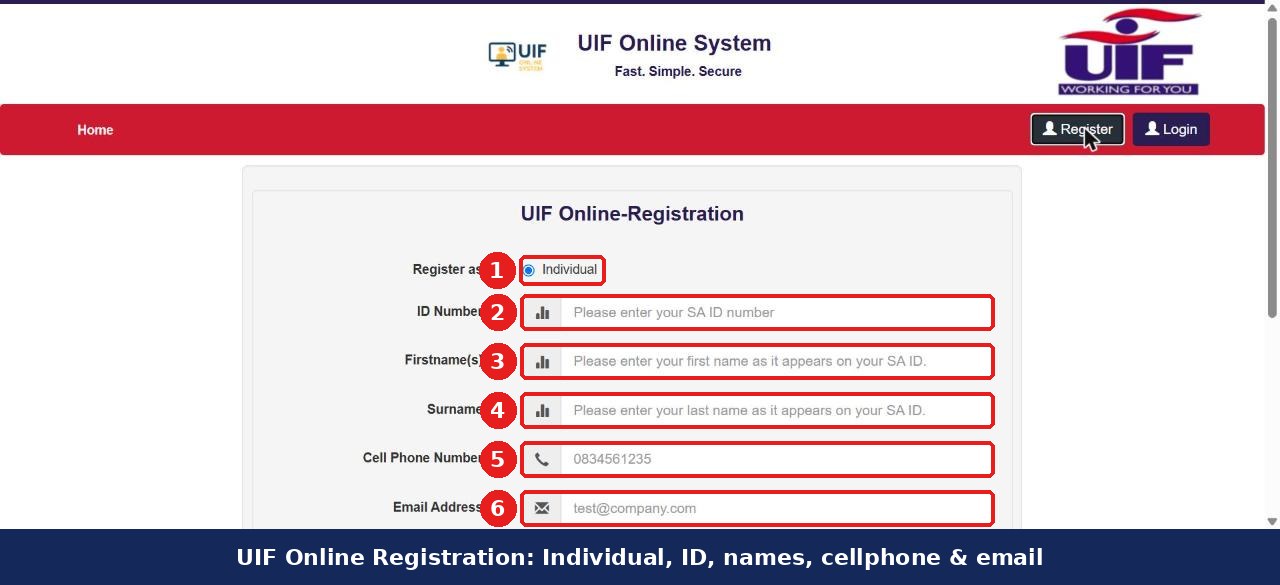
Step 1: Open UIF Online and click Register
Go to uifonline.labour.gov.za and tap Register at the top right.
Step 2: Choose “Individual”
Leave Individual selected under “Register as”.
Step 3: Enter your ID number and names
Type your ID number, then your first name(s) and surname exactly as they appear on your ID.
Step 4: Add your cellphone and email
Add your cellphone number and email address.
Step 5: Create a password
Create a password and finish the security check.
Step 6: Activate your account
Activate the account with the link or OTP sent to you, then log in.
Your details are checked against Home Affairs. If the system won’t accept your ID, there’s usually a name or spelling mismatch – visit a labour centre with your original ID to get it sorted.
Registering as an employer on UIF Online? The pop-up will ask whether you have a UIF reference number. Choose Yes and enter it, or No and enter your company CK number instead.
Logging in to UIF Online, step by step
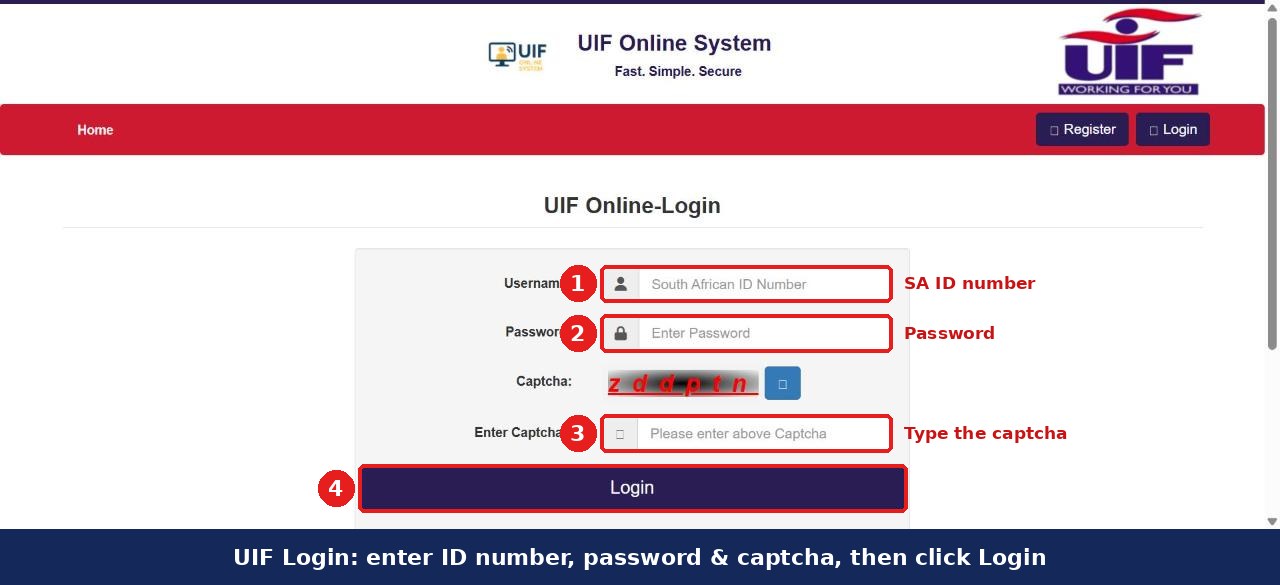
Step 1: Open the UIF Online login page
Open the UIF Online login page.
Step 2: Enter your ID number as username
Username: your ID number – no spaces.
Step 3: Enter your password
Password: the one you created when you registered.
Step 4: Type the captcha
Captcha: type the letters in the image. Can’t read them? Hit the little refresh button next to it.
Step 5: Click Login
Click Login.
One small thing that trips people up: the site logs you out if you sit idle. When the “session expiring” message pops up, click Continue or you’ll lose what you’ve typed.
uFiling login for employers
Step 1: Go to the uFiling login page
Head to ufiling.labour.gov.za/uif/login.
Step 2: Enter your username and password
Enter your uFiling username and password and click Login.
Step 3: New employer? Register first
First time? Click Register, accept the terms, fill in the employer details and activate via email or SMS.
uFiling is free apart from your normal bank charges. You can pay by Instructed Debit Pull or through Nedbank or FNB, and bigger employers can use the Bulk Upload Declaration tool instead of capturing workers one by one. The official uFiling user guide is on the site under Manuals if you get lost. You can also register as an employer in person at a labour centre.
Forgot your password or username?
Happens to everyone. You can fix it yourself in a couple of minutes.
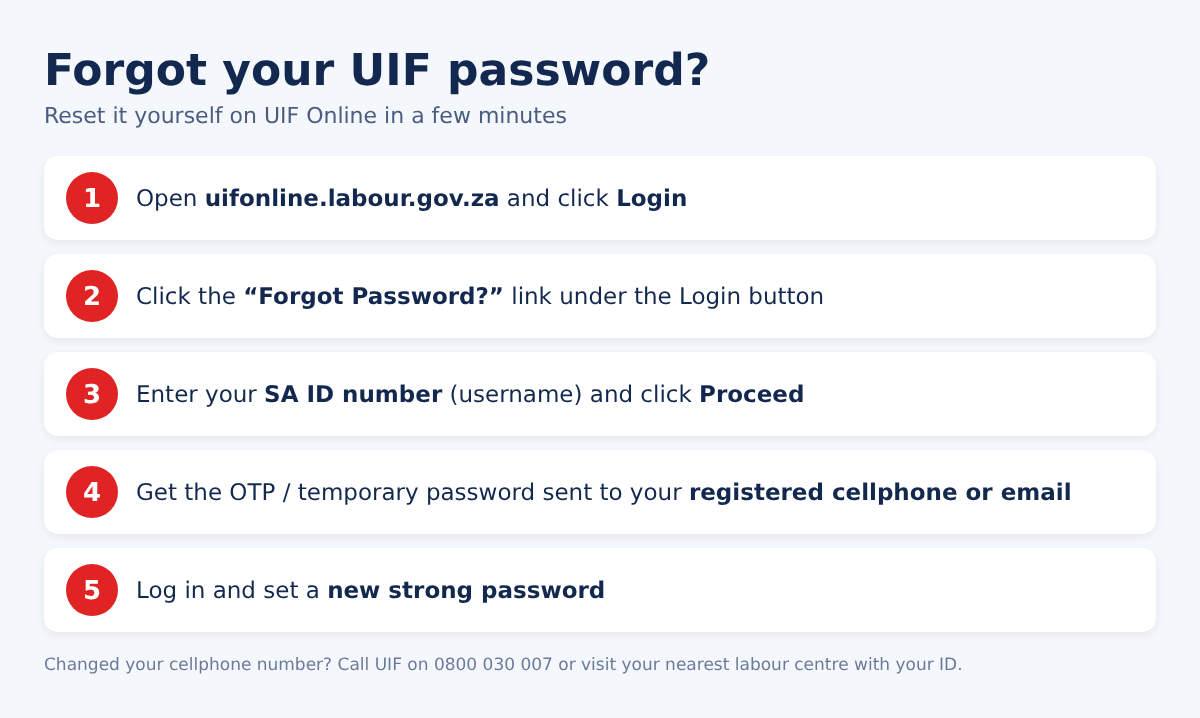
Step 1: Click “Forgot Password?”
On the login page, click Forgot Password?
Step 2: Enter your ID number
Enter your ID number and click Proceed.
Step 3: Get your OTP
Wait for the OTP or temporary password on your phone or email.
Step 4: Set a new password
Log in with it and set a new password straight away.
On uFiling there are separate Forgot Username and Forgot Password links. Employers resetting on UIF Online can use their UIF reference number or CK number.
Locked out after too many tries, or your old cellphone number is still on the account? Call 0800 030 007 or 012 337 1680, or take your ID to a labour centre so they can update your details.
What you can do once you’re logged in
As a worker, you can apply for benefits, upload documents, see your claim history and credits, check whether your employer has actually declared you (Employee Declaration Status), update your bank and contact details, submit continuation forms every four weeks, and lodge an appeal if a claim is turned down.
As an employer, you can register workers, submit monthly or annual declarations, pay contributions, record new hires and terminations, provide UI-19 details and confirm your returns are up to date.
Applying for benefits online
- Log in to UIF Online.
- Choose the benefit: unemployment, maternity, illness, adoption, reduced work time or dependants’.
- Check your personal and employment details.
- Capture your bank details – the account must be in your name.
- Upload your UI-19, UI-2.8, bank statement, payslips and any medical proof.
- Sign the declaration and submit. Keep the reference number you get by SMS.
After that, payments come every four weeks – but only if you keep submitting your continuation of claim (confirming you’re still unemployed and looking for work). Miss one and payments stop. Most complete claims are processed in roughly 2 to 6 weeks; if it’s been more than eight weeks, it’s worth calling or visiting a labour centre.
Prefer doing it in person? Take your original ID, UI-19, latest payslip, a bank letter or stamped statement, a reference letter from your employer and proof of address to any labour centre. Go early – queues can be long.
Benefits and how much you could get
| Benefit | Who it’s for | Good to know |
|---|---|---|
| Unemployment | Retrenched, dismissed or contract ended | Claim within 12 months; register on ESSA. Resigning usually doesn’t qualify unless the CCMA rules it constructive dismissal. |
| Illness | Off sick for more than 14 days | Only if you’re not getting your full salary |
| Maternity | Pregnant contributors | Up to 121 days at a flat 66%. Apply before the birth or within 12 months after. |
| Parental | New parents | Covers 10 days of parental leave |
| Adoption | Adopting a child under 2 | Court order needed |
| Reduced work time | Still employed, fewer hours | Employer must confirm the cut |
| Dependants’ | Spouse, partner or children of a contributor who died | Claim within 18 months of the death |
You build up one day of credit for every four days you work, to a maximum of 365 days in any four-year period. Payments are on a sliding scale – lower earners get a bigger percentage, roughly 38% to 60% of salary. As a rough guide, someone earning R5,000 a month might get around R2,330, while someone at the R17,712 cap gets about 38%.
Who can’t claim: people who resigned or were fired for misconduct, the self-employed (unless they contributed as an employer), people already receiving a pension, and anyone who has used up their credits. Foreign nationals who were legally employed and contributed can claim.
Contributions: what employers need to know
Employers deduct 1% from the worker and add their own 1%, so 2% in total. The earnings ceiling is R17,712 a month, which caps each side at R177.12. For example, a R15,000 salary means R150 from the worker and R150 from you – R300 a month. Anyone working more than 24 hours a month must be declared, domestic workers included. Businesses registered for PAYE pay through SARS; everyone else pays UIF directly on uFiling.
Common UIF login problems (and what fixes them)
- “Invalid username or password” – use your ID number as the username, not your email. Still failing? Reset the password.
- Captcha won’t go through – refresh the image and watch upper and lower case.
- Account locked – reset the password or call 0800 030 007.
- “No employee found” – your employer hasn’t declared you. Ask them to do it on uFiling, or report it to UIF.
- Page won’t load – clear your browser cache and cookies, try Chrome or another device, and check your data/Wi-Fi.
- System offline – the portal goes down for maintenance now and then. Try again later or use a labour centre (they have free Wi-Fi and helpers).
- Claim stuck – usually wrong bank details, a missing employer declaration, an ID mismatch or a missing document.
- Trying to claim on uFiling – claims moved to UIF Online.
Getting the SASSA SRD grant? A UIF payment can make you ineligible for SRD that month, because SASSA cross-checks UIF records.
If a claim is rejected, you’ll get a notice with the reason. You can appeal in writing – do it quickly, within the time stated on the notice. Dismissal disputes go to the CCMA.
UIF contact details
UIF toll-free line
0800 030 007
Monday to Friday, 07:30–16:00
- Toll-free: 0800 030 007 (Mon–Fri, 07:30–16:00)
- Head office: 012 337 1680
- UIF Online: uifonline.labour.gov.za
- uFiling: ufiling.labour.gov.za
- Provincial offices: labour.gov.za UIF contacts
- SARS on UIF: sars.gov.za
A few safety habits worth keeping: check that the address ends in labour.gov.za every time, never give your OTP or password to anyone (including “UIF agents” on Facebook or WhatsApp), don’t pay anyone to submit a claim, log out on shared computers and keep your phone number up to date.
FAQs
What’s my UIF login username?
Your 13-digit South African ID number.
Can I still claim on uFiling?
No. Worker claims are now on UIF Online. uFiling is for employers.
What documents do I need?
ID, UI-19, a bank-stamped UI-2.8 with a bank statement, recent payslips and proof of work-seeker registration – plus medical or court documents for those benefit types.
How long does a claim take?
Usually 2 to 6 weeks if your documents and your employer’s declarations are in order.
Can I claim if I resigned?
Generally no, unless the CCMA finds it was constructive dismissal. You can still claim maternity, illness or adoption benefits.
Is UIF Online free?
Yes, completely. Anyone charging you a fee to “process” your UIF is not from the Fund.
Final word
Remember the one rule that clears up most confusion: workers use UIF Online, employers use uFiling. Get your documents scanned before you start, keep your bank details correct and submit your continuation forms on time. If you’re stuck, 0800 030 007 is your best first call.
About this blog: UIF Login is a small independent site that explains South Africa’s UIF systems in plain language. We check our guides against the official UIF Online and uFiling websites and update them when things change. Spotted something out of date? Let us know.